Link Brother TD-4550 printer per network from the browser
This explains step by step how to be able to print with Andy by network from the browser, specifically from Google Chrome.The printers that are now compatible with this function are the Brother TD-2350, TD-4550DNBW and the Zebra brand.
 Before the process begins, see this article on theApproved printers for tagging with Andy.
Activate printer network mode
First of all, make sure you havethe printer connected by network cable. Once connected, from the printer itself, activates wired Network mode, follow these steps to do so:
1. Press Menu.
2. Select Wired LAN:
3. Select TCP/IP configuration:
4. Select Auto or Statics (as you want to specify a fixed IP). If you selectAuto, the IP assigned can be consulted atMenu > Wired LAN > Wired LAN status.
Here is importantwrite down the IP addresswhich is displayed and then introduced in Andy
Link the printer to Andy
In order to print from the browser, first of all you need to use Google Chromeand have the extension installedAndy Printer Extension
Once the extension is installed and you access Andy, you must go toConfiguration>Printer>Add printerand follow these steps:
1. Select your printer model
2. Select the printing method Red
3. Enter the IP address which has the printer assigned
4. Click Save settings
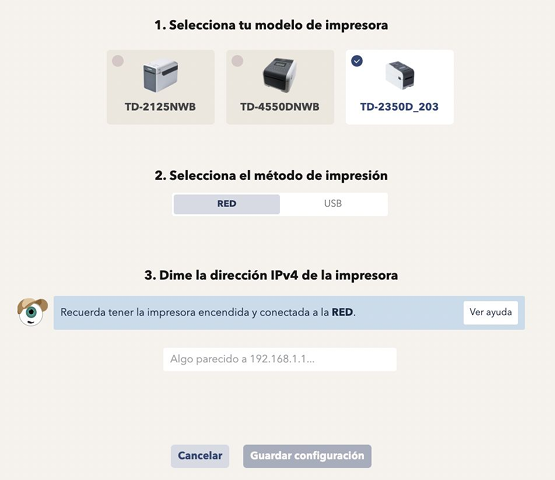
Ready! You already have your printer paired and ready to print via network from your browser.
2. Select the printing method Red
3. Enter the IP address which has the printer assigned
4. Click Save settings
Ready! You already have your printer paired and ready to print via network from your browser.